Odisha is no stranger to cyclones, but recent storms have become more intense due to climate change. Cyclone Dana is one of several storms to hit India in 2024, and experts are concerned about the growing frequency and severity of such events. Coastal erosion, high sea levels, and stronger winds are all contributing to the increased risk for the people of Odisha. With Dana expected to make landfall in the next 24-48 hours, authorities are urging residents to stay safe and heed evacuation orders.
]]>Rural areas, too, felt the impact. Excessive rainfall caused landslides in the mountainous regions and destroyed crops across vast agricultural belts, affecting farmers’ livelihoods. At the same time, the unpredictability of rainfall has also left some regions in drought. This dual threat of floods and drought is making it harder for India to manage water resources effectively.
The intensifying weather patterns can be linked to increasing global temperatures, which disrupt traditional weather systems, like the Indian Ocean Dipole and El Niño, further aggravating the situation. Scientists predict that if immediate action isn’t taken to reduce global emissions, these extreme weather events will only grow in frequency and severity, creating long-term economic and environmental challenges for the country.
- Study AI Models: Gain a solid understanding of AI language models, their architecture, and typical use cases. Resources like OpenAI’s documentation, research papers, and tutorials provide valuable insights.
- Experiment with Prompts: Practice crafting and testing different prompts using platforms that offer access to language models. Start with simple prompts and gradually experiment with more complex ones.
- Analyze and Iterate: Evaluate the AI’s responses, identify areas for improvement, and refine your prompts. Hands-on practice is crucial for developing an intuitive sense of effective prompt design.
- Learn from Examples: Review examples of successful prompts shared by the AI community. Online forums, GitHub repositories, and AI-focused blogs are excellent sources of inspiration and guidance.
- Join AI Communities: Engage with AI practitioners and researchers through online communities and forums. Platforms like Reddit, Stack Overflow, and specialized AI forums are great for asking questions, sharing experiences, and learning from others.
- Take Online Courses and Workshops: Enroll in courses that cover prompt engineering and related AI topics. Educational platforms offer comprehensive courses on AI, machine learning, and natural language processing (NLP).
- Read Books and Articles: Explore books, articles, and blog posts about AI and prompt engineering. This literature provides both theoretical knowledge and practical tips.
- Participate in Competitions and Challenges: Joining AI competitions and challenges offers practical experience and exposes you to new ideas and techniques.
Conclusion
Prompt engineering is a powerful technique for unlocking the potential of AI language models. By understanding the model’s capabilities, managing context effectively, and iteratively refining prompts, you can guide AI to generate accurate and relevant responses. Embrace the learning journey through experimentation, community engagement, and continuous improvement to become proficient in this essential AI discipline.
]]>What is Prompt Engineering?
Prompt engineering is the art and science of designing input prompts to elicit desired behaviors from AI models. By carefully structuring the language, context, and instructions within a prompt, practitioners can influence the model’s output, ensuring it aligns with specific goals or requirements. This process involves iterative testing and refinement to achieve optimal results.
Key Aspects of Prompt Engineering
Effective prompt engineering requires a deep understanding of the model’s capabilities, clear communication of context and instructions, and a systematic approach to refining prompts. Here are the key aspects to consider:
- Understanding the Model’s Capabilities: Before diving into prompt creation, it’s essential to grasp what the AI model can and cannot do. Familiarize yourself with its training data, response patterns, and limitations. This foundational knowledge helps set realistic expectations and informs the design of effective prompts.
- Iterative Testing and Refinement: Prompt engineering is an iterative process. Start with a basic prompt, observe the model’s response, and refine the prompt based on the output. This cycle of testing and tweaking continues until the desired result is achieved. Iterative refinement allows for continuous improvement and adaptation to specific use cases.
- Context Management: Providing sufficient context within the prompt is crucial for accurate and relevant responses. This includes setting the scene, specifying the desired format, and including any necessary background information. Effective context management ensures that the AI understands the task and generates appropriate outputs.
- Instructions and Constraints: Clear instructions and constraints guide the AI model in generating responses that meet your requirements. Specify aspects like response length, tone, style, and key points to cover. Well-defined instructions help mitigate ambiguity and improve the precision of the AI’s output.
- Handling Ambiguity and Bias: Ambiguity and bias can lead to inaccurate or unintended responses. Craft prompts that are clear and unambiguous to minimize misunderstandings. Additionally, be mindful of potential biases in the language or assumptions used in prompts, and strive to create neutral and inclusive prompts.
[/vc_column_text][/vc_column][/vc_row]
]]>The following are the basic features of a CMS:
Easy Administration:
- The admin dashboard is the powerfull tool in any CMS and it should make it very easy to manage all the operations involved in content production. This means:
- Track the scheduled content and related assets.
- Monitoring site and administrator activity
- Creating functionality through modules and plugins.
- Managing notifications for each and every tasks
- Administering multiple sites and platforms.
It is very easie to handle the content workflow within a single piece of software that gives everyone the appropriate access for their level of responsibility.
Powerful Publishing Tools:
Just as the content you publish is the backbone of your interaction with your key audiences, publishing tools are the core of any CMS. A good CMS will adapt to the type of content you want to publish – everything from short news items to longer articles with custom layouts to landing pages with embedded documents – and integrate this into an overall publication workflow.
When working with content, it’s also very important to be able to move articles around when needed. For example, you may need to un-publish a seasonal promotion or content, while keeping the content handy to be refreshed the following year.
SEO Tools:
Search engine is always tweaking its search algorithms and there are many factors that influence your website ranking.
While it may be difficult to know every off-page factor that plays into your website search rankings, you can be sure that on-page search engine optimization isn’t going away.
A great CMS will have built in SEO tools to help you automatically create URLs that work for both readers and search engines.
Social Media Integration:
It easy to share the content on social media platforms using sharing buttons , and also ensure your content is optimized for sharing on each platform, to encourage users to share your content with their audiences.
Think about whether your CMS automatically formats your articles in Twitter cards, or if it appends your Twitter username to any piece of shared content. Or if it uses Open Graph tags to optimize the display of shared content on Facebook.
Analytics:
Your CMS should integrate with the most popular analytic tools like Google Analytics – so that you can keep track your KPIs right from your dashboard.
Admins should also understand where the key audiences are coming to your website, what technology they are using, how they are interacting with content on which platforms, and which pieces of content are most popular, base on user engagement you refine the content strategy.
Security:
When you are using different content management systems, keep a closely monotring on security:
What the platform offers
How much work it’s going to be for your team to achieve your security standards
Whether your customers and their data are going to be secure
The CMS has made creation, management of website contents for businesses easily, effective and secure. That is because managing a complex website with high numbers of contents is not an easy way and it is need to be done by a webmaster who will organize contents that it made by many authors. Also businesses need to have CMS because planning, creation and archiving contents will be managed by the CMS in easy way. Open source CMS are financially viable option for large companies with highly complex websites if they found the best one that have their requirements and it can help them to achieve their goals in the future.
]]>Drupal 8 is the latest release of the world’s largest and most widely used enterprise web Content Management System(CMS). It takes an already terrific content management framework to ever greater heights for users, administrators, and developers. It is Fast and Flexible. This time Drupal 8 taps into the concentrated innovation from its open source community and there are seriously focus on user-friendliness, content presentation, new ways to create data structures, build APIs, multilingual capabilities and Etc.
While Symfony 2 powers the Drupal 8 backend, a lighter and faster core offers tons more capabilities for modules and themes. Plus, the Drupal 8 migration and the onward curve is significantly reduced.
Drupal 8 Features
User friendly & Usable Backend:-
Drupal 8 was a big upgrade in usability experience and backend admin interface. You will find it much easier to use. Using Drupal admin without coding knowledge, users can create almost websites from small to medium size.
Theming:-
Drupal 8 is having more flexibility in theme modifications via its backend interface. It is very useful for both non-techenical users & developer. In any CMS if there is a complex function, non- technical users will not be able to implement it.
Drupal 7 uses PHPtemplate engine, which allows embedding PHP code into Html. This will not suite for users with no PHP coding skills. And we can see a great changes in Drupal 8. The newest version uses Twig, a standard providing an easy to use format for non-technical users.
If the users does’t have the coding knowledge Drupal backend will helps and able to manage a theme.
Multilanguage:-
Drupal 7 languages and translations are supported by a third party module. And we face a lot of difficulties working with it. There are lots of resources to manage – a long menu, languages divided into lots of clones, nodes increasing many times respectively.
A good thing is now Multilanguage has been in Drupal core. Users can now have an easier time working with content, and integrate a language they wants with less time.
In the admin interface has built-in translations. Users can also create pages with language based Views filtering and block visibility.
Views:-
Views is an integral part of most website projects, and a lot is pretty much impossible without it. Site designers have used use this contributed module to output Pages,galleries, maps, graphs, lists, posts, tables, menus, blocks, reports, and what-have-you. With this Drupal 8 feature, Views is part of and firmly integrated with the core.
The front page and several administration pages are now Views, and users will now be able to quickly create pages, blocks, admin sections, etc., and modify existing ones just as effortlessly.
Block is an Entity now:-
Drupal 7 was developed from the old version of PHP. Basically, Drupal up to the 7 version is not an OOP platform (object-oriented programming).Drupal 8 is based on a strong potential framework – Symfony. Drupal has made a great improvement in OOP. This is a big advantage for drupal professional coders, and also for companies with high standard of programing, unit test designing,maintenance and security.
Wysiwyg:-
Now Wysiwyg editor also included in Drupal core. And also in this version the checkbox to customize your toolbar has been replaced by a drag and drop interface. It’s really convenient.
Another change is the ability to edit the page content directly on the page it is displayed. Let’s say I want to edit my uploading image, I don’t have to be navigated to another page, tab, or overlay to configure it.
Web service:
In the past, websites were only for desktop and web services were only used for websites using a service from other systems to name a few, Google Map, Weather forecast, ….
Nowaday, with the advent of many different devices like mobiles and tablets, web services are most important than ever. Although there is responsive design to permits html shown responsive on different interfaces, there is a limitation of content surplus and overloaded resources for small devices. To improve performance for this kind of design, web services have been applied so that
In Drupal 7, web services are supported by a third party module – Services. And since it is such an important and prominent function, Services has been included in Drupal 8 core.
]]>PHP is basically the backbone of several websites.Almost all the growing startups use it even facebook relies on it a lot but When it comes to start open source development there are a few key points to consider:
- Is PHP platform allow your product to steer the progression of that tech platform?
- Does an PHP technology meet your business goals and customer demands?
- Does the PHP technology meet standards of IT and customer quality policies?
- Are scalability and customization key to this product’s success?
- Are legacy systems hampering the customer experience?
- Do we have the resources to keep proprietary systems current and stable?
- Can we remain open and collaborate throughout development and product growth?
PHP satisfies the above major key points but why major companies are not happy to introduce the PHP technology.
Because PHP is free and open source, big companies need big clients whom they can do premium charge. f they use PHP their project values goes down and that they will not like that.Sites developed in .NET are 30-40% costlier than same functionality site developed in PHP.
]]><?php
?>
or the shorthand PHP tag that requires shorthand support to be enabled
on your server...
<?
?>If you are writing PHP script and plan on upload in live server, we suggest that you can the standard format (which includes the <?php ?>) rather than the shorthand form. This will ensure that your scripts will work, even when running on other hosting servers with different settings.
Save PHP File:
For suppose you have PHP included into your HTML and want to execute the file in the web browser to interpret it correctly, then you must save the file with a .php extension, instead of the standard .html extension. Instead of index.html, it should be index.php if there is PHP code in the file.
PHP code can be written right into your HTML, like this:
<!DOCTYPE html>
<html>
	<head>
	</head>
	<body>
        <p>
          <?php
        echo "This is my first php program";
          ?>
        </p>
	</body>
</html>
Your PHP code inside of the delimiters. Here we use the function echo to output “This is my first php program””. We also end the line with a semicolon.
If you save this file (e.g. myfrist.php) and place it on PHP enabled server and load it up in your web browser, then you should see “This is my first php program” displayed.
Result:
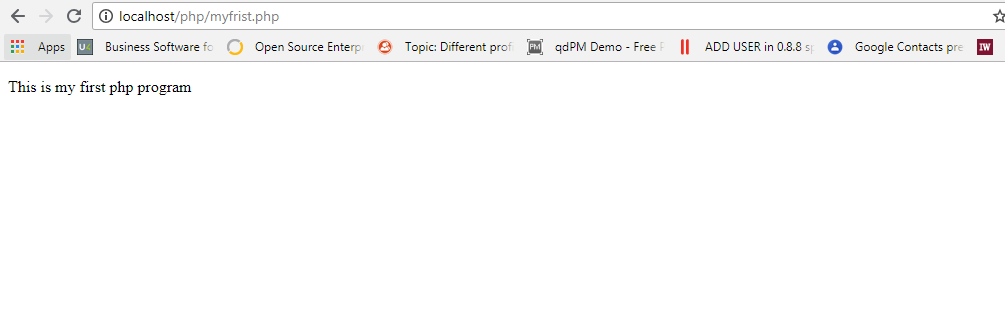
As you observed the above example, there was a semicolon after the line of PHP code. The semicolon signifies the end of a PHP statement and should be mandatory.
]]>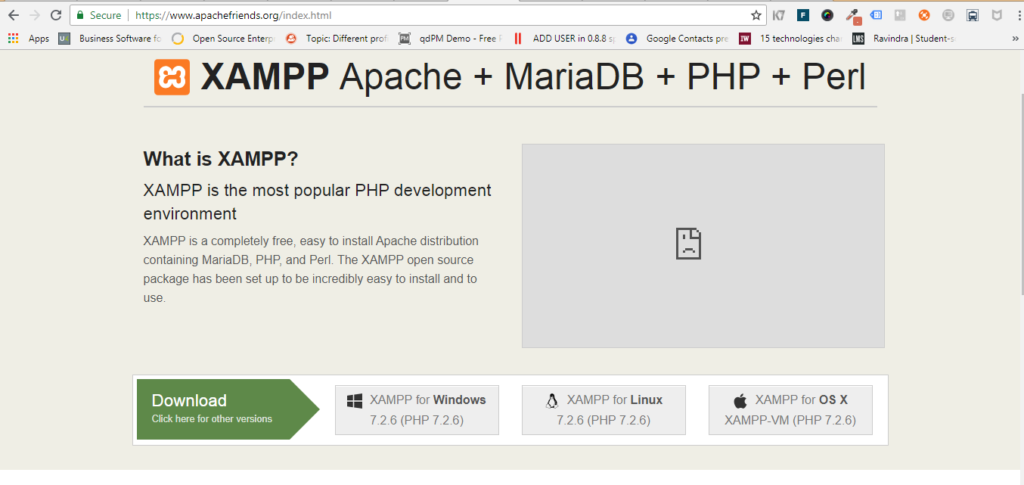
Go to the Apache Friends website and download XAMPP for Windows. For the easiest install, download the Basic Package’s “self-extracting RAR archive.” Wait for the download to finish and open it to begin installing XAMPP. Click the “Install” button to start the file extraction. When the Command Prompt screen appears, press the “Enter” key at every question to accept default settings.
Start the XAMPP server. When started, XAMPP loads itself into your icon tray.Single-click the icon to expand the Control Panel. Click on the “Start” button next to “Apache” to start your Apache Web server. When Apache is running, the word “Running” will appear next to it, highlighted in green. Also start “MySQL” if your PHP scripts are having database operations.
Tray XAMPP Icon:
 Before start XAMPP Server:
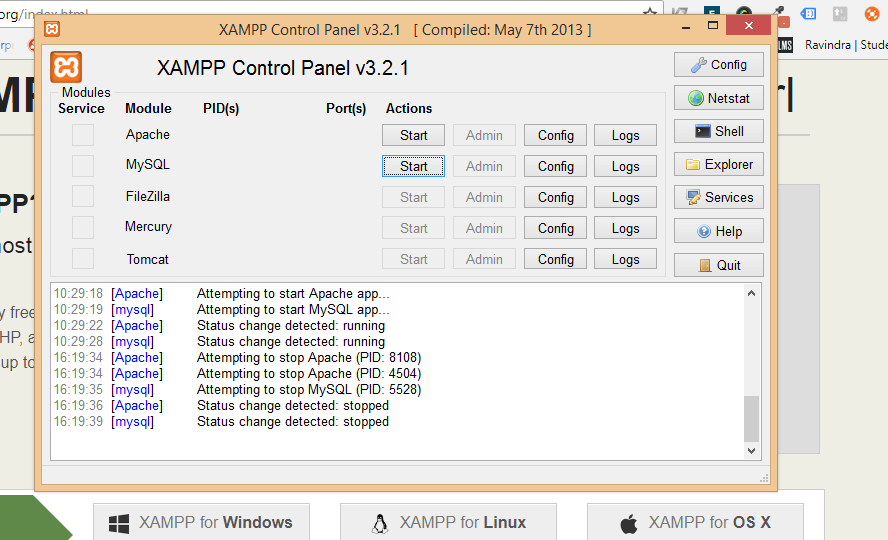
After XAMPP Start:
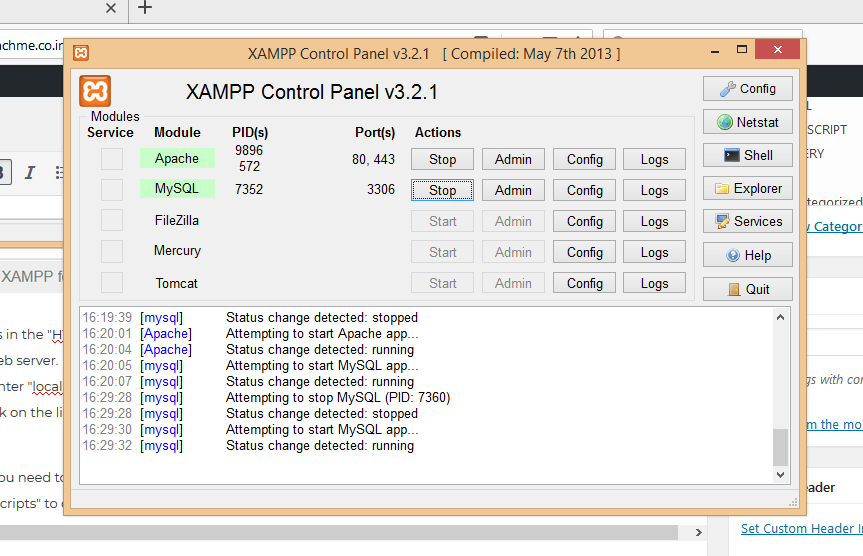
Place your PHP files in the “HTDocs” folder located under the “XAMMP” folder on your C: drive. The file path is “C:\xampp\htdocs” for your Web server. Make sure your PHP files are must save with “.php” file extension. Open the any Web browser on your desktop and enter “localhost” into the address box. The browser will open a list of files placed under the “HTDocs” folder in your computer. Click on the link to a PHP file and open it to run a script.
Create new folder you need to test PHP files in your “HTDocs” folder. If you create a folder named “php,” then use the address “localhost/php” to open them in your browser.